Lorem ipsum dolor sit amet, consectetur adipiscing elit, sed do eiusmod tempor incididunt ut labore et dolore magna aliqua. Ut enim ad minim veniam, quis nostrud exercitation ullamco laboris nisi ut aliquip ex ea commodo consequat. Duis aute irure dolor in reprehenderit in voluptate velit esse cillum dolore eu fugiat nulla pariatur.
Building vertical AI notetakers: What sales, recruitment, healthcare and financial advice tools need to get right
We're all familiar with the horizontal players in the AI notetaker market. Granola, Fireflies, Fathom, and others. But, because we've mapped this market, we know the vertical players, too. There are more of them than ever, and if you ask us, they’re some of the most exciting products in this market. That’s because they solve one specific problem, for one specific profession, very well.
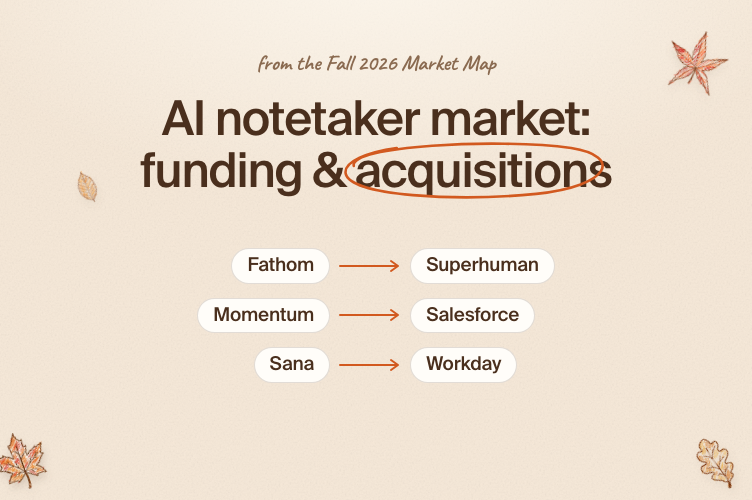
AI notetaker market 2026: funding, acquisitions and what comes next
AI notetakers are one of the most interesting categories in software right now. To map it, we evaluated hundreds of vendors' products and surveyed 2,000+ end users about the tools they’re currently using.
How the AI meeting assistant market has evolved, and where it’s headed next
More than $1 billion in venture funding has gone into meeting assistant tools over the last three years. The result is a crowded market where 97% of users trust AI-generated meeting notes, yet only 41% use their assistant to trigger a workflow. That gap says a lot about where this market stands in 2026: capturing a meeting is mostly solved, and almost everything that comes after it is still up for grabs.
Using Gladia speech-to-text API with virtual meeting recordings
Published on Oct 10, 2023
Over the past few months, we’ve been working with many of our clients to help them integrate Gladia’s speech-to-text and audio intelligence API into their products.
Many of these companies operate in the virtual meeting space, either by building bots to record and transcribe audio and video meetings on platforms like Zoom, Google Meet, and Microsoft Teams; using these bots to take notes and generate summaries and action items; or by creating their own virtual meeting platform. Together, we’ve identified a few common pain points, challenges, and best practices to overcome them and would like to share hands-on tips on configuring your API to get the best results, including in multilingual environments.
The challenge in virtual meetings
A typical meeting scenario for companies with international or multilingual employees, or for sales and customer support calls, will often start with a few people speaking in one language, usually their native tongue. At some point, one or more additional speakers will join the call, and everyone will switch to a common language from that point onwards.
These scenarios pose a few challenges - correctly detecting the language, understanding who the different speakers are and what each said, and getting results in the required latency.
Recommended configuration
1. Multilingual support
tldr: The best mode for asynchronously transcribing meeting recordings is ‘automatic single language’. It will correctly detect the main language of the meeting and transcribe accordingly while automatically translating any parts spoken in secondary languages.
Gladia supports 3 different modes of language support:
Manual - specify a single language for the audio to be transcribed to.The resulting transcription will be in the specified language, regardless of how many languages were spoken in the audio.Any speech in languages other than the one configured, will be translated automatically. ⚙️ Use for: Cases where a specific pre-known language is needed for the transcript. ⚠️ Limitations: Other languages will be automatically translated to the specified language.
Automatic single language - For asynchronous audio, this behaviour will automatically detect the most prominent language in the audio and use it to transcribe.Segments of speech in other languages will automatically be translated.For live streaming, language will be automatically detected based on the first chunk of audio and will be used for the remainder of the stream. ⚙️ Use for: Most common use cases, including meetings that start in one language and switch to another. ⚠️ Limitations: Secondary languages will be automatically translated to the main language (the one most spoken); Live transcription will detect based on the first utterance only.
Automatic multiple languages (code-switching) - This mode will continuously detect the language spoken and support multiple language changes in a single audio.The resulting transcription will be in multiple languages. ⚙️ Use for: Use cases with languages being changed multiple times in the audio, e.g. a journalist interviewing someone in one language and getting responses in another. ⚠️ Limitations: Currently sensitive to strong accents, which may cause the wrong language to be detected.
2. When to use live vs asynchronous transcription
Tl;dr: For most needs, using async transcription will provide the best balance between price, accuracy, and speed. For cases where real-time or very low latency transcription is needed, use live transcription.
Gladia supports two types of transcription - asynchronous (aka batch) and live. With the asynchronous API, audio files are sent to be transcribed by our AI model, and a transcription is returned in response. Some of the benefits of this method are: the ability to use automatic single language detection (mentioned in the previous section), using a highly accurate transcription model, and being able to use speaker diarization to identify text spoken by different speakers.
With our live transcription API, a WebSocket connection is opened between the user and Gladia. Audio is streamed in small chunks, and transcription results are continuously sent back. This method provides results in real-time with very low latency, and is useful for situations where results need to be displayed quickly in reaction to what’s being said.Since the audio is transcribed in small chunks - language detection with automatic single language will only be based on the first utterance in the audio.
3. Speaker diarization
Tl;dr: When using the API of a virtual meeting service or recording bot, it’s better to rely on their built-in mechanical diarization API, based on separate audio sources. If no such API is available, Gladia provides a high-quality audio-based diarization.
Speaker diarization is the process of assigning the correct speaker to different segments of speech in an audio. Virtual meeting platforms such as Zoom receive the audio from different participants separately, so they usually have an API to correctly assign different speakers to different portions of the audio. When combined with accurate word-level timestamps, this can be used to generate a highly accurate diarized transcript. Most meeting bot providers offer this type of diarization in their API.
In cases where mechanical diarization is unavailable, it’s recommended to use Gladia’s diarization feature, which uses AI and audio analysis to detect multiple speakers in a single audio file and assign the correct speaker to each text segment.
4. Importance of sync and accurate timestamps
Tl;dr: Many advanced features, such as aligning speaker separation and transcription, audio-based diarization, and sending transcriptions to LLMs, require extremely accurate word-level timestamps. Luckily, Gladia provides one of the most accurate timestamp alignment solutions in the market, including for live transcription.
Any form of analysis of a speech recording, especially in a virtual meeting scenario, starts with the accuracy of the transcript timestamps.
Producing an accurately diarized transcript by synchronizing the text to the mechanical audio diarization and understanding which speaker said what, relies on correct and accurate timestamps. Even just a few seconds of incorrect offset could result in a completely wrong diarization, which attributes text to the wrong speaker, changing the meaning and context of what was said. For some use cases such as sales and CRM enrichment, this would make the whole transcript meaningless.
In turn, sending a meeting transcript to an LLM to generate insights such as summaries, chapters, data extraction, requires the utmost accuracy from the diarization. Text that’s attributed to the wrong speaker will generate incorrect and often entirely incoherent insights.
Summary
Navigating the various transcription features and options and finding the optimal configuration for your meeting recording product can be tricky. We’ve gathered the experience from multiple companies with similar needs and challenges and combined the knowledge into the guidelines in this post.We hope it will help you build a better product while significantly shortening the development time.
At Gladia, we built an optimized version of Whisper in the form of an API, adapted to real-life professional use cases and distinguished by exceptional accuracy, speed, extended multilingual capabilities and state-of-the-art features, including speaker diarization and word-level timestamps.
Contact us
Your request has been registered
A problem occurred while submitting the form.
Read more
Speech-To-Text
Building vertical AI notetakers: Sales, recruitment, healthcare and financial advice tools
Speech-To-Text
AI notetaker market 2026: funding, acquisitions and what comes next
Speech-To-Text
The AI meeting assistant market evolution
From audio to knowledge
Subscribe to receive latest news, product updates and curated AI content.
Thank you! Your submission has been received!
Oops! Something went wrong while submitting the form.